> For the complete documentation index, see [llms.txt](https://docs.xverse.app/llms.txt). Markdown versions of documentation pages are available by appending `.md` to page URLs; this page is available as [Markdown](https://docs.xverse.app/sats-connect/spark-methods/flashnet-trading/spark_flashnet_executerouteswap.md).
# spark\_flashnet\_executeRouteSwap
{% hint style="info" %}
This method is coming :soon:
{% endhint %}
Use the `spark_flashnet_executeRouteSwap` method to request a multi-hop swap through Flashnet.\
Your app specifies the input amount, route (up to 4 hops), and slippage parameters. The wallet handles the full process: verifying the Spark transfer, signing the swap request, submitting it to Flashnet, and returning the results.
This abstracts all route complexity into a single wallet request while preserving atomic execution: either all hops succeed, or the swap is reverted.
***
## Example
```ts
import { request } from "sats-connect";
try {
const response = await request("spark_flashnet_executeRouteSwap", {
userPublicKey: "02abcdef0123456789abcdef0123456789abcdef0123456789abcdef01234567",
initialSparkTransferId: "spark-route-transfer-uuid-123456",
inputAmount: 100000000, // sats or smallest unit of input asset
maxRouteSlippageBps: 200, // 2.00% tolerance
minAmountOut: 99500000, // optional safety check
nonce: "unique-route-swap-nonce-789",
hops: [
{
assetInAddress: "03bitcoinassetpubkey0000000000000000000000000000000000000000000000",
assetOutAddress: "03ethereumassetpubkey1111111111111111111111111111111111111111111111",
hopIntegratorFeeRateBps: "25",
poolId: "03pool1aabbccddeeff00112233445566778899aabbccddeeff00112233445566778"
},
{
assetInAddress: "03ethereumassetpubkey1111111111111111111111111111111111111111111111",
assetOutAddress: "03usdstablecoinpubkey2222222222222222222222222222222222222222222222",
hopIntegratorFeeRateBps: "25",
poolId: "03pool2bbccddeeffffaabbccddeeff00112233445566778899aabbccddeeff0011"
}
]
});
if ("result" in response) {
console.log("Route swap result:", response.result);
} else {
console.error("Route swap failed:", response.error.message);
}
} catch (error) {
console.error("Unexpected error:", error);
}
```
***
## Parameters
{% hint style="success" %}
:rocket: Become an **Xverse Partner** to enable **integrator fees for your app ⇒** [**reach out**](https://calendly.com/jan-xverse) to get started
{% endhint %}
* **`userPublicKey`** *(string, required)* — Spark public key of the user.
* **`initialSparkTransferId`** *(string, required)* — Spark transfer ID proving the input deposit.
* **`inputAmount`** *(integer, required)* — Amount of input asset in smallest units.
* **`maxRouteSlippageBps`** *(integer, required)* — Maximum slippage allowed for the entire route.
* **`minAmountOut`** *(integer, required)* — Minimum acceptable final output.
* **`nonce`** *(string, required)* — Unique identifier to prevent replay.
* **`hops`** *(array, required)* — Ordered sequence of hops (1–4). Each hop includes:
* `assetInAddress`
* `assetOutAddress`
* `poolId`
* `hopIntegratorFeeRateBps` (optional)
* **`integratorFeeRateBps`** *(integer)* — Fee (in basis points) your app requests for routing the swap.\
:warning:**To activate your app fee, you must be an approved Xverse partner.** If you’re not approved, Xverse will ignore this value and apply its own default fee instead.\
:rocket: [**Contact Xverse**](https://calendly.com/jan-xverse) to become a partner and activate your app fee.
* **`integratorPublicKey`** *(string)* — Public key where your integrator fees should be sent.\
:warning: **Only partner-approved (whitelisted) keys are accepted.**\
If you pass a non-partner key, Xverse will replace it with its own.\
:rocket: [**Contact Xverse**](https://calendly.com/jan-xverse) to become a partner and get your key whitelisted.
***
## What it does
When called, the wallet:
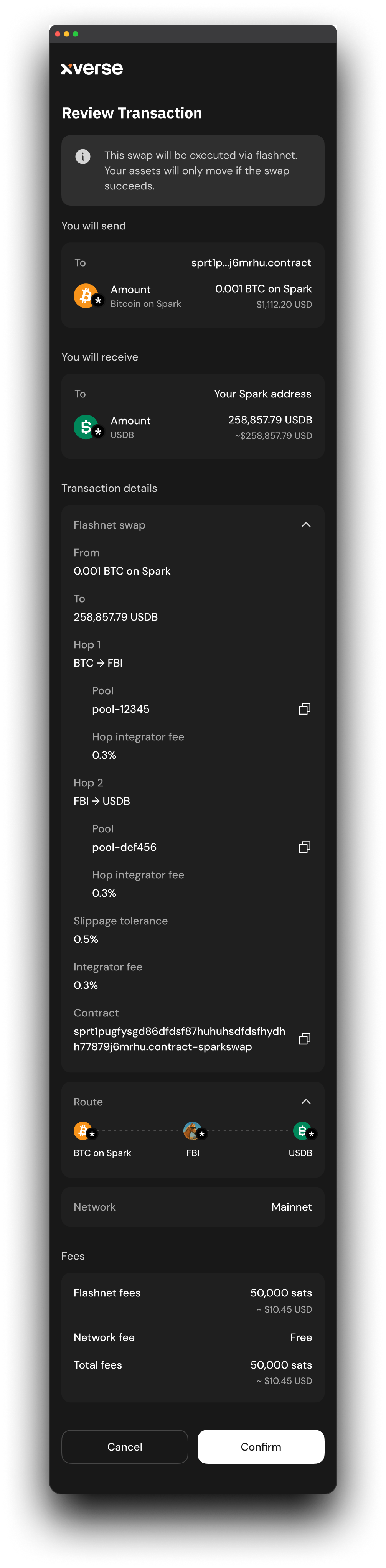
1. Shows a **confirmation screen** summarizing:
* Input asset & amount
* Route hops (pool IDs, asset in/out per hop)
* Expected output & slippage tolerance
* Applicable fees
2. On approval:
* Validates and signs the route swap request
* Submits to Flashnet
* Displays a progress screen
3. Returns the route swap result back to the dApp.
***
## Response
The method returns a Promise resolving to a `SparkFlashnetRouteSwapResult`.
### **✅ Success**
```json
{
"accepted": true,
"outputAmount": 99500000,
"executionPrice": "0.00004975",
"finalOutboundTransferId": "spark-transfer-out-123",
"requestId": "01HJZKFABCDEFGHJKLMNPQRSTVW"
}
```
### **❌ Failure**
```json
{
"accepted": false,
"error": "Insufficient liquidity on hop 2",
"refundedAssetAddress": "03bitcoinassetpubkey0000000000000000000000000000000000000000000000",
"refundedAmount": 100000000,
"refundTransferId": "spark-transfer-refund-456",
"requestId": "01HJZKFABCDEFGHJKLMNPQRSTVW"
}
```
---
# Agent Instructions
This documentation is published with GitBook. GitBook is the documentation platform designed so that both humans and AI agents can read, navigate, and reason over technical content effectively. Learn more at gitbook.com.
## Querying This Documentation
If you need additional information that is not directly available in this page, you can query the documentation by asking a question.
Perform an HTTP GET request on the following URL with the `ask` and `goal` query parameters:
```
GET https://docs.xverse.app/sats-connect/spark-methods/flashnet-trading/spark_flashnet_executerouteswap.md?ask=&goal=
```
`ask` is the immediate question: it should be specific, self-contained, and written in natural language.
`goal` is what the user is ultimately trying to achieve, the reason they need the answer. Sharing it helps GitBook give you a better, more relevant answer. A goal is most helpful when it describes the outcome the user wants rather than restating the question. For example, with `ask=how do I create an API token`, a goal like `automate deployments from our CI pipeline` lets GitBook tailor the answer to that use case.
The response will contain a direct answer to the question and relevant excerpts and sources from the documentation.
Use this mechanism when the answer is not explicitly present in the current page, you need clarification or additional context, or you want to retrieve related documentation sections.