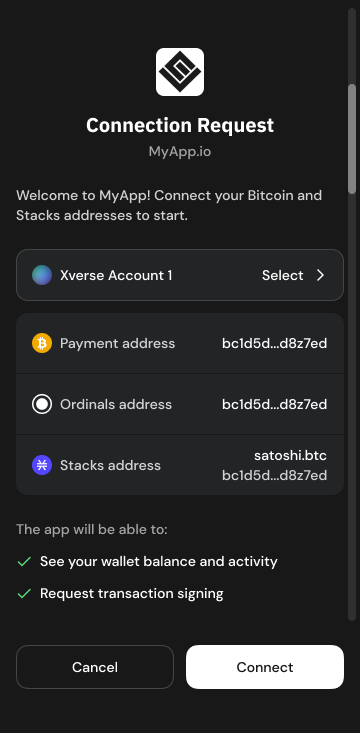
> For the complete documentation index, see [llms.txt](https://docs.xverse.app/llms.txt). Markdown versions of documentation pages are available by appending `.md` to page URLs; this page is available as [Markdown](https://docs.xverse.app/sats-connect/xverse-wallet-permissions.md).
# Xverse Wallet Permissions
## Motivation
Sats Connect mediates interactions between your app and your user's Xverse wallet through appropriate user consent.
**XvereseWallet Permissions** allow your app to reduce user friction and avoid prompting the user for consent on every action.
### Request read access to a wallet account's addresses and holdings
To allow for a smooth user experience and avoid prompting your user repeatedly for the authorisation to access their account data, your app remains *connected* to the user's account after the initial [connection request](/sats-connect/connecting-to-the-wallet/connect-to-xverse-wallet.md).
While connected, your app has **permission to read account data** using any of the below methods, without additional prompts to the user:
* :bitcoin::red\_circle::sparkle: [getAccount](/sats-connect/wallet-methods/wallet_getaccount.md)
* :bitcoin: [getAddresses](/sats-connect/bitcoin-methods/getaddresses.md)
* :bitcoin: [getBalance](/sats-connect/bitcoin-methods/getbalance.md)
* :art: [ord\_getInscriptions](/sats-connect/bitcoin-methods/ord_getinscriptions.md)
* :black\_square\_button: [runes\_getBalance](/sats-connect/bitcoin-methods/runes_getbalance.md)
* :red\_circle: [stx\_getAccounts](/sats-connect/stacks-methods/stx_getaccounts.md)
* :sparkle: [spark\_getAddresses ](/sats-connect/spark-methods/spark_getaddress.md)
* :sparkle: [spark\_getBalance](/sats-connect/spark-methods/spark_getbalance.md)
### Request a transaction or message signature from the wallet account
Sats Connect currently still requires **user authorisation for every transaction or message signature**. Every Bitcoin or Stacks transaction or message signature request will prompt the user for approval.
{% hint style="info" %}
We may introduce transaction & message permissions in the near future to help apps reduce user friction. If your app requires them, reach out in our [developer forum](https://discord.com/invite/tN84HhSDrz) :pray:
{% endhint %}
## Request Xverse Wallet Permissions
You can use `request("wallet_requestPermissions")` to prompt the user for the authorisation to access their account data.
If the user had not granted your app permissions already, they will be prompted to approve a [connection request ](/sats-connect/connecting-to-the-wallet.md)from your app.
{% hint style="info" %}
Note that reading account data is currently the single type of permission available. This permission is automatically requested with the [`connect`](/sats-connect/connecting-to-the-wallet.md)`method`
{% endhint %}
When retrieving data from the wallet account using methods that require permission, the general flow can be:
`request("example-method")` (e.g. :orange\_circle: [getBalance](/sats-connect/bitcoin-methods/getbalance.md))
* If your app has read permission -> the method will successfully return the required data
* If your app does not have permission -> the method will throw [an access denied error](#user-content-fn-1)[^1]
* 1\) you can use `request("wallet_requestPermissions")`. This will show a connection popup to the user asking them to accept the request.
* 2\) Once your user grants you permission, you can `request("example-method"` again
Example: Requesting a connection when a request has insufficient permissions
```typescript
import { RpcErrorCode, request } from "sats-connect";
async function example() {
const res1 = await request("getBalance", undefined);
if (res1.status === "success") {
// Happy path.
return res1.result.total;
}
if (res1.error.code !== RpcErrorCode.ACCESS_DENIED) {
// Something else went wrong.
throw new Error("Failed to get balance.", { cause: res1.error });
}
// Insufficient permissions. Request permissions and try again.
const res2 = await request("wallet_requestPermissions", undefined);
if (res2.status === "error") {
// User declined.
throw new Error("User declined connection.");
}
const res3 = await request("getBalance", undefined);
if (res3.status === "error") {
// Something went wrong.
throw new Error("Failed to get balance.", { cause: res3.error });
}
return res3.result.total;
}
```
## Get your current Xverse Wallet Permissions
You can use `wallet_getCurrentPermissions` to determine whether the user's wallet account is connected to your app, and query the current permissions granted to your app for that account.
{% code title="wallet\_getCurrentPermissions response" %}
```json
[
{
"type": "account",
"resourceId": "45ef66eec3fb95f636131f8f00e278fa12bb5adb76e9ea6f256202dbd2b209ca",
"clientId": "https://sats-connect.netlify.app",
"actions": {
"read": true
}
}
]
```
{% endcode %}
| Property | Description |
| ---------- | ---------------------------------------------------------------------------------------------------------------------------------------------------------- |
| type | The type of resource represented by the object Example: `"wallet" \| "account"` |
| clientId | The client identifier associated with the request or resource access. This can be a URL or an identifier for the client application accessing the resource |
| resourceId | A unique identifier for the resource (e.g., an account). |
| actions | An object representing the actions that are allowed or permitted on the resource. |
## Renounce Xverse Wallet Permissions
You can clears your app's permissions for all wallet accounts with [`request("wallet_renouncePermissions")`](/sats-connect/connecting-to-the-wallet/disconnect-from-xverse-wallet.md), effectively disconnecting users from your app.
[^1]: to check with [Eduard Bardají Puig](mailto:undefined)
---
# Agent Instructions
This documentation is published with GitBook. GitBook is the documentation platform designed so that both humans and AI agents can read, navigate, and reason over technical content effectively. Learn more at gitbook.com.
## Querying This Documentation
If you need additional information that is not directly available in this page, you can query the documentation by asking a question.
Perform an HTTP GET request on the following URL with the `ask` and `goal` query parameters:
```
GET https://docs.xverse.app/sats-connect/xverse-wallet-permissions.md?ask=&goal=
```
`ask` is the immediate question: it should be specific, self-contained, and written in natural language.
`goal` is what the user is ultimately trying to achieve, the reason they need the answer. Sharing it helps GitBook give you a better, more relevant answer. A goal is most helpful when it describes the outcome the user wants rather than restating the question. For example, with `ask=how do I create an API token`, a goal like `automate deployments from our CI pipeline` lets GitBook tailor the answer to that use case.
The response will contain a direct answer to the question and relevant excerpts and sources from the documentation.
Use this mechanism when the answer is not explicitly present in the current page, you need clarification or additional context, or you want to retrieve related documentation sections.